 Live Tennis API
Free n8n workflow templates for tennis data
Live Tennis API publishes five n8n workflows you can import and run. They send live score alerts to Telegram, a daily order of play to Discord and weekly ranking changes by email. The other two write finished matches to Google Sheets and post break-point alerts to Slack. Each one comes in two versions, one built on n8n's HTTP Request node and one on the Live Tennis API community node. The JSON is free to use and change under the MIT licence.
- Live score alerts to Telegram (Free plan)
- Daily order of play to Discord (Free plan)
- Weekly ranking changes by email (Free plan)
- Finished matches to Google Sheets (BASIC plan or above)
- Break-point alerts to Slack (ULTRA plan)
Which version should I import?
Take the HTTP Request version if you are not sure. It uses only nodes that ship with n8n, so it runs on n8n Cloud and on your own server with nothing to install. The community node version uses n8n-nodes-livetennisapi. It adds a Live Tennis API node with every resource and operation listed, so you pick them from menus instead of typing URLs. n8n lists the package as a verified community node, which means you can add it from the nodes panel. On a self-hosted instance you can also install it under Settings, Community nodes, as n8n's guide explains.
What do I need before I import one?
- An API key. The free plan needs no card and allows 30 requests a minute and 100 a day. Three of the templates run on it. Finished matches need the BASIC plan, and break-point webhooks need ULTRA. See pricing.
- An n8n instance, on n8n Cloud or your own server.
- An account on the app the template sends to: Telegram, Discord, an email server, Google Sheets or Slack.
The files hold no API key and no credential. After you import one, create the credential once and pick it on each node. For the HTTP Request version, that is a Header Auth credential with these two fields, with your own key in place of the placeholder:
Name:  X-API-Key
Value: YOUR_LIVE_TENNIS_API_KEY
For the community node version, create a Live Tennis API credential and paste in your API key.
How do I import a template?
- Copy the link of a JSON file below.
- In n8n, open a new workflow. In the three-dot menu next to its name, choose Import, then From URL, and paste the link. For a downloaded file, choose From file instead.
- Open each node that shows a warning and select your credentials.
- Fill in the Config node. Every value you need to change is there, with a placeholder or an example.
- Run the workflow once to check the result, then activate it.
Each workflow also carries its setup steps in a yellow note on the canvas.
Live score alerts to Telegram
Get a Telegram message when a player you follow goes on court and at the end of each set. When the match ends, the message has the final score. The workflow polls the live list every 20 minutes and compares it with the last run. A score you already have is never sent twice. Club organisers and coaches can follow a few players this way without watching a scores page.
HTTP Request version (JSON), Live score alerts to TelegramCommunity node version (JSON), Live score alerts to Telegram
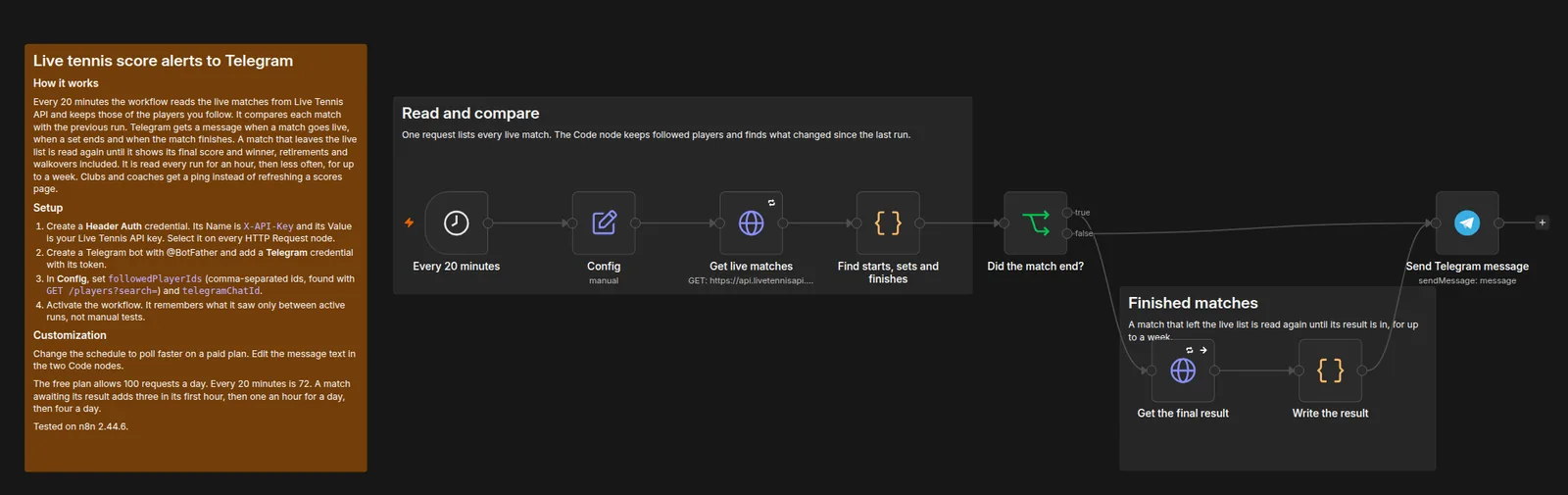
- Every 20 minutes: get live matches
- Keep followed players, compare with the last run
- Finished match: read the final result
- Send a Telegram message
Full-size screenshots: HTTP Request version, community node version.

How to set it up
- Create the API key credential described above and select it on every node that calls Live Tennis API.
- Create a Telegram bot with @BotFather and add a Telegram credential with its token.
- In Config, set followedPlayerIds and telegramChatId.
- Activate the workflow. It only remembers the last run while it is active, not in manual test runs.
Daily order of play to Discord
Post one Discord message each morning with the matches your players have in the next 24 hours, with start times in your own time zone. It matches players on id where the schedule has one and on surname where it has only a name. That way qualifying matches still show up. A fan server or a fantasy league can share one schedule like this.
HTTP Request version (JSON), Daily order of play to DiscordCommunity node version (JSON), Daily order of play to Discord
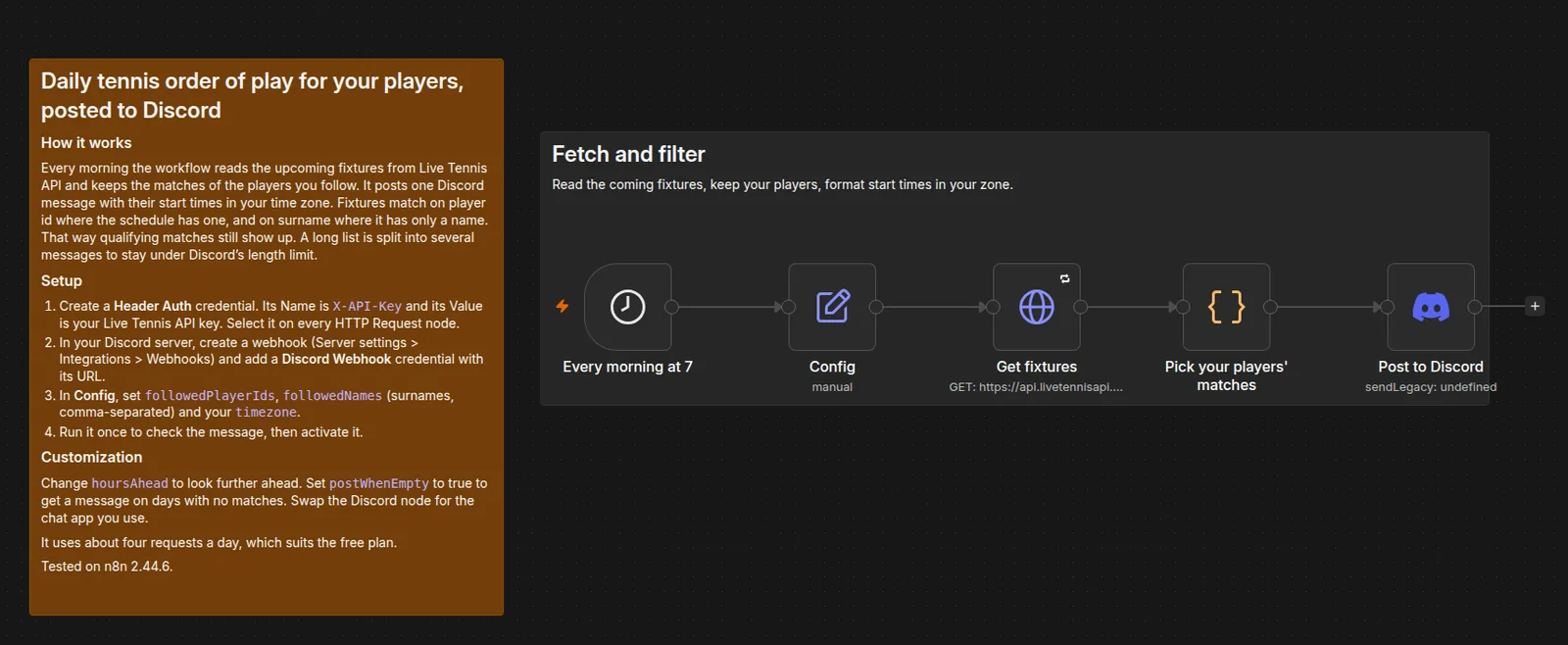
- Every morning: get the coming fixtures
- Keep followed players by id or name
- Format start times in your zone
- Post to Discord
Full-size screenshots: HTTP Request version, community node version.

How to set it up
- Create the API key credential described above and select it on every node that calls Live Tennis API.
- Create a webhook in your Discord server (Server settings, Integrations, Webhooks) and add a Discord Webhook credential with its URL.
- In Config, set followedPlayerIds, followedNames and timezone.
- Run it once to check the message, then activate it.
Weekly ranking changes by email
Every Monday, get a short email on how the players you follow moved in the ranking. It shows places gained or lost and points won or dropped, biggest moves first. Players who entered or left the ranking are named too. If you track a short list of players, you get the week in one email instead of looking each one up.
HTTP Request version (JSON), Weekly ranking changes by emailCommunity node version (JSON), Weekly ranking changes by email
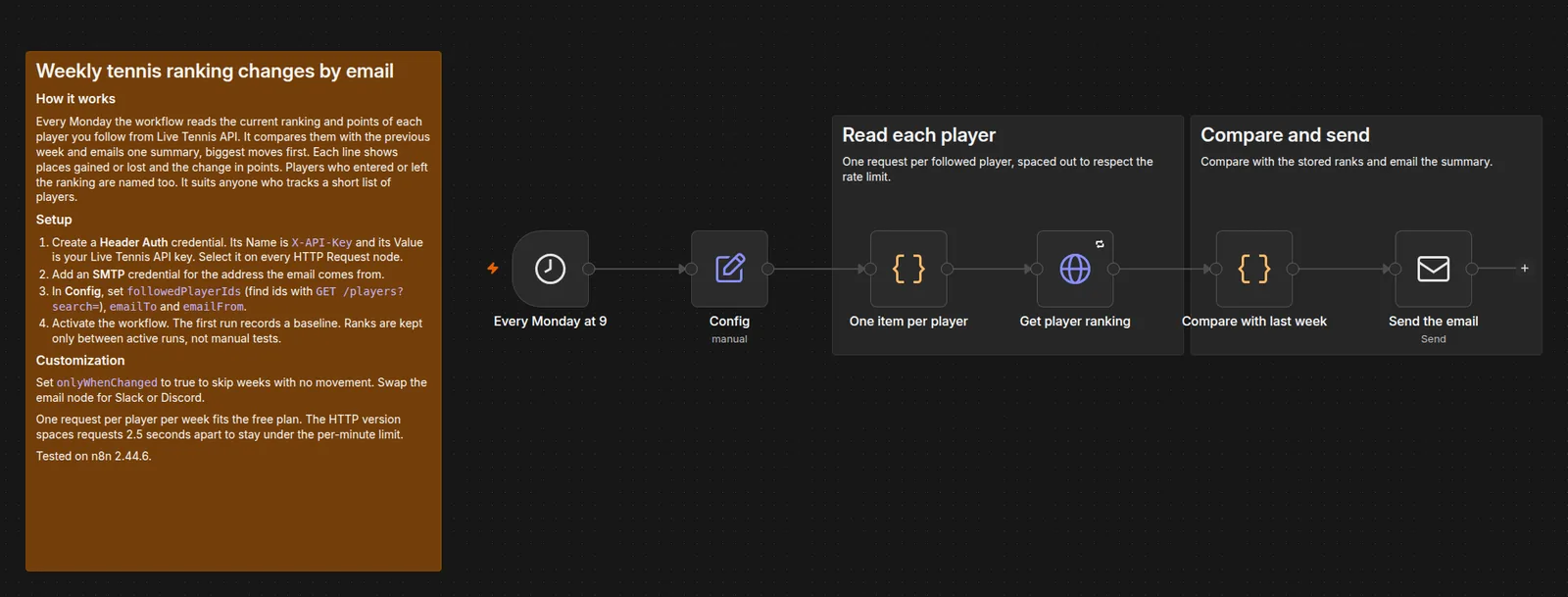
- Every Monday: one item per followed player
- Get each player's ranking
- Compare with last week
- Send one email
Full-size screenshots: HTTP Request version, community node version.

How to set it up
- Create the API key credential described above and select it on every node that calls Live Tennis API.
- Add an SMTP credential for the sending address.
- In Config, set followedPlayerIds, emailTo and emailFrom.
- Activate it. The first run records a baseline, and changes show from the second week.
Finished matches to Google Sheets
Keep a Google Sheet of every finished match: date, tour, level, tournament, round, surface, players, winner, set scores and outcome. Each morning the workflow asks for the completed matches that changed since its last run, so a late result or a corrected one still arrives. It adds or updates one row per match, keyed on match_id, so a repeat never makes a duplicate. It suits a model's training log or a results newsletter.
HTTP Request version (JSON), Finished matches to Google SheetsCommunity node version (JSON), Finished matches to Google Sheets
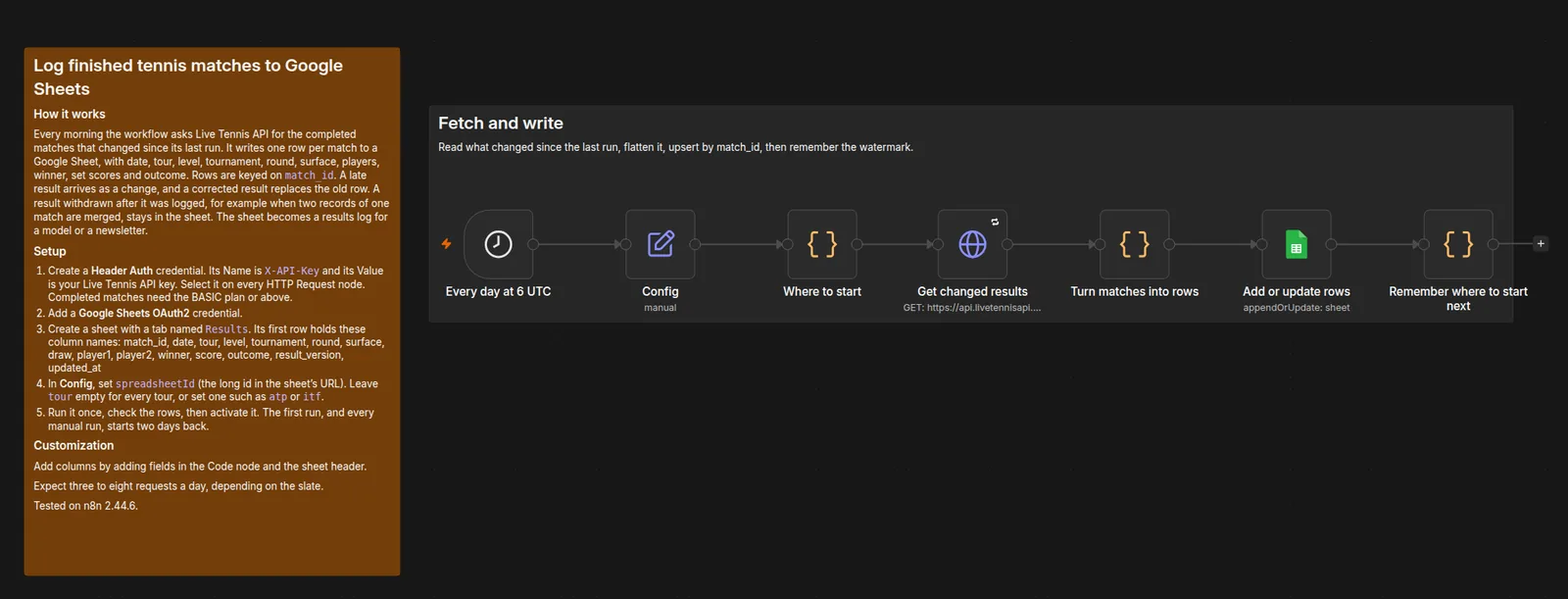
- Every day: get the completed matches that changed since the last run
- Turn each match into a row
- Add or update rows by match_id
- Remember where to start next time
Full-size screenshots: HTTP Request version, community node version.

How to set it up
- Create the API key credential described above and select it on every node that calls Live Tennis API.
- Add a Google Sheets OAuth2 credential.
- Create a tab named Results whose first row is the column list below.
- In Config, set spreadsheetId. Leave tour empty for every tour, or set atp, wta, challenger or itf.
- Run it once, check the rows, then activate it.
The first row of the Results tab:
match_id, date, tour, level, tournament, round, surface, draw, player1, player2, winner, score, outcome, result_version, updated_atBreak-point alerts to Slack
Post to a Slack channel the moment a break point comes up in a match of a player you follow. A second message says whether the game ended in a hold or a break. Live Tennis API sends each event as a signed webhook, so nothing polls. The workflow checks the HMAC signature and the timestamp before it reads the match. It suits a trading desk or a live blog that reacts to the points that swing a match.
HTTP Request version (JSON), Break-point alerts to SlackCommunity node version (JSON), Break-point alerts to Slack
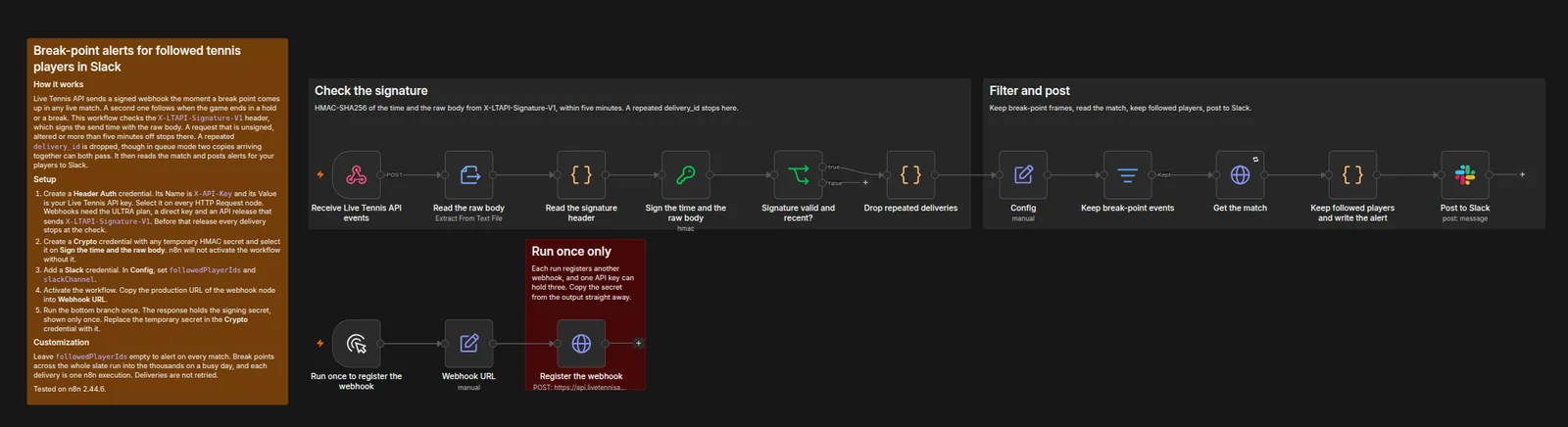
- Webhook: receive the signed event
- Check the HMAC signature and timestamp
- Read the match and keep followed players
- Post to Slack
Full-size screenshots: HTTP Request version, community node version.

How to set it up
- Create the API key credential described above and select it on every node that calls Live Tennis API.
- Check that the API sends the X-LTAPI-Signature-V1 header. The workflow verifies only that header, so before that release every delivery stops at the check.
- Create a Crypto credential with any temporary HMAC secret and select it on Sign the time and the raw body. n8n will not activate the workflow without it.
- Add a Slack credential, then set followedPlayerIds and slackChannel in Config.
- Activate the workflow and copy the webhook node's production URL into Webhook URL.
- Run the bottom branch once. Replace the temporary secret in the Crypto credential with the signing secret from its output.
What should I know before relying on them?
- The score and ranking workflows remember the previous run in n8n's workflow static data. n8n saves that only for active workflows, so a manual test run always starts from nothing and reports every match as new.
- Break-point webhooks cover every live match, not only your players. Each delivery is one n8n execution, which counts towards an n8n Cloud plan's executions. Deliveries are not retried, so a missed one is gone. A repeated delivery is posted once, except in queue mode, where two copies arriving together can both post.
- The results sheet adds and corrects rows but never deletes one. A result withdrawn after it was logged, for example when two records of one match are merged, stays in the sheet.
- Fixture start times are scheduled times. They move when an earlier match runs long.
- The free plan's daily allowance resets at midnight. If a workflow uses it up, the next runs fail until it resets, and n8n shows the error on the execution.
If you would rather not run n8n at all, Break-point Alerts sends break points to email, Discord, Telegram or SMS with no workflow to maintain.
How were they tested?
On 28 October 2026 each file was imported into a new self-hosted n8n 2.44.6 with n8n-nodes-livetennisapi 0.2.1. Each one then ran against the live API. The Telegram, Discord and email nodes sent to a local test server that recorded each message. The break-point workflow was sent requests that were signed, altered, out of date, re-stamped, repeated or carrying only the old signature header. Only signed, current, first deliveries went through. The Slack and Google Sheets nodes passed n8n's own checks on their settings, but were not posted to a real workspace or sheet.
Can I change them or share them?
Yes. The templates are under the MIT licence, so you can copy, change and pass them on. The API reference for every endpoint they call is in the documentation. If you build something on one, or a node misbehaves, write to hello@livetennisapi.com.
Templates version 1.0, published 28 October 2026. Tested with n8n 2.44.6 and n8n-nodes-livetennisapi 0.2.1.